MAI-Image-2.6-Flash vs GPT Image 2: Same-Prompt Bakeoff

A client wants an opening poster that can go to print. Two Chinese characters in the title cannot smear. The English subtitle cannot collapse into a blob. A price list sits next to them. You open the new model’s press note and see “twice as fast as the best model we have” and “world-class cost.” Finger on Generate: switch, or keep the one that already renders type.
On 4 September 2026, Microsoft wrote that into MAI-Image-2.6-Flash: the speed SKU of the 2.6 flagship, aimed at low latency and high throughput. Mustafa Suleyman’s post that day said it is 2× faster than GPT-Image-2 with 72% better GPU efficiency; the site copy is narrower — 2.8× faster than GPT-Image-2-Medium. Both numbers come with a date. Do not mash them into one sentence.
This piece does not rewrite the product sheet. It answers three questions: what Flash is actually selling; what you see when you run the Playground sample prompts on GPT Image 2, left vs right; and which door to open today if you need print type, conversational edits, or a cost ledger. After we published, ChatIMG added MAI Image 2.6 Flash to the model picker (20 credits). The right-hand images in this bakeoff are still GPT Image 2 — Flash was not wired in yet. You can now pick Flash and rerun the same prompt.
Table of Contents
- What 4 September shipped: Flash sells speed
- Same prompt, left vs right: portrait, chrome, poster type
- How to read the official numbers: 2.8× and 72%
- Pick by task: speed, small type, conversational edit
- Can ChatIMG select Flash today?
- Falsifiable predictions
- FAQ
What 4 September shipped: Flash sells speed
Short answer: As of 4 September 2026, Microsoft wrote MAI-Image-2.6 as the flagship and MAI-Image-2.6-Flash as the production speed tier. The site copy says Flash is 2.8× faster than GPT-Image-2-Medium with 72% better GPU efficiency. Entry points: MAI Playground and the Microsoft Foundry catalog.
The same-day note also says the 2.6 family has multi-image reference editing, web grounding, dynamic aspect ratios, and resolution up to 1.5K. What you can click in ChatIMG is MAI Image 2.6 Flash: text-to-image and reference-image edit. Web grounding is still on the Foundry / Playground capability list — do not treat it as a switch already open on the ChatIMG home page.
The 10 August post 2.6 launches at #2 on Arena later changed its dates: as of 4 September, both 2.6 and 2.6-Flash are in Foundry Public Preview. Mustafa’s 4 September follow-up also pointed at Foundry and Playground. When you cite a ranking, the date must sit in the sentence — the Arena text-to-image board is live.
The family still has 2.5. That day sold scene-aware local edit, not throughput. If the job is “change one line of type, freeze the rest,” start with MAI-Image-2.5 local edit vs chat. Do not paste Flash speed numbers onto an edit task.
Demo: Microsoft’s official 21-second intro for the 2.5 family. 2.6-Flash is the 2026-09-04 speed SKU; as of publish there is no separate official clip. Source: YouTube · Microsoft.
Practical rule: Count how many lines of a launch note talk about speed / price / edit. If speed outnumbers edit, this piece is a throughput pick, not another recap of the press conference.
Same prompt, left vs right: portrait, chrome, poster type
Short answer: We do not have a Foundry key. Hitting Generate on Playground bounces to a Microsoft login. The fair comparison we can run: open a Flash sample, copy that prompt, and send it to GPT Image 2 on ChatIMG. Left image is the Playground official sample. Right image is GPT Image 2 on 2026-09-05.
Three tasks match what Microsoft itself stresses — portrait, commercial finish, type:
| Task | What the Playground sample is selling | GPT Image 2, same prompt | Wall clock |
|---|---|---|---|
| Tree-shadow portrait | Closed eyes, pores, leaf projections | Same closed eyes and tree shadow; stray hair across the frame | 50.5s |
| Liquid-metal knot | High-reflect chrome, environment warp | More knots; indoor lamps in the mirror | 20.6s |
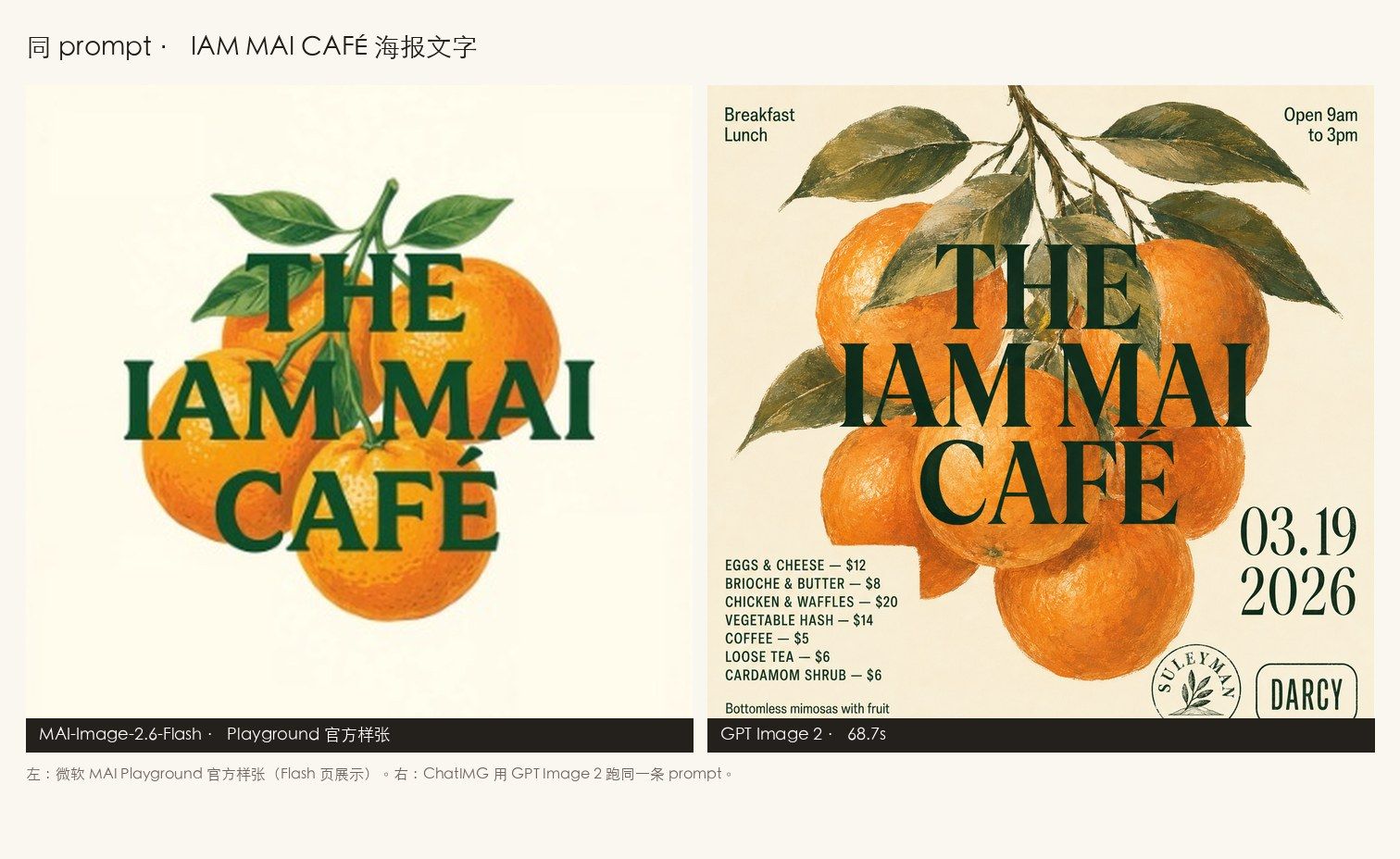
| IAM MAI CAFÉ poster | Homepage thumb shows title + orange only | Menu, prices, date, both logos land in the layout | 68.7s |
On the portrait, neither side turns “skin” into a retouched ad. The official sample’s bokeh grid is harder; GPT Image 2 writes the prompt’s “wind-blown flyaways” in front of the nose. That is not a winner. It is two models grabbing different details from the same instruction.
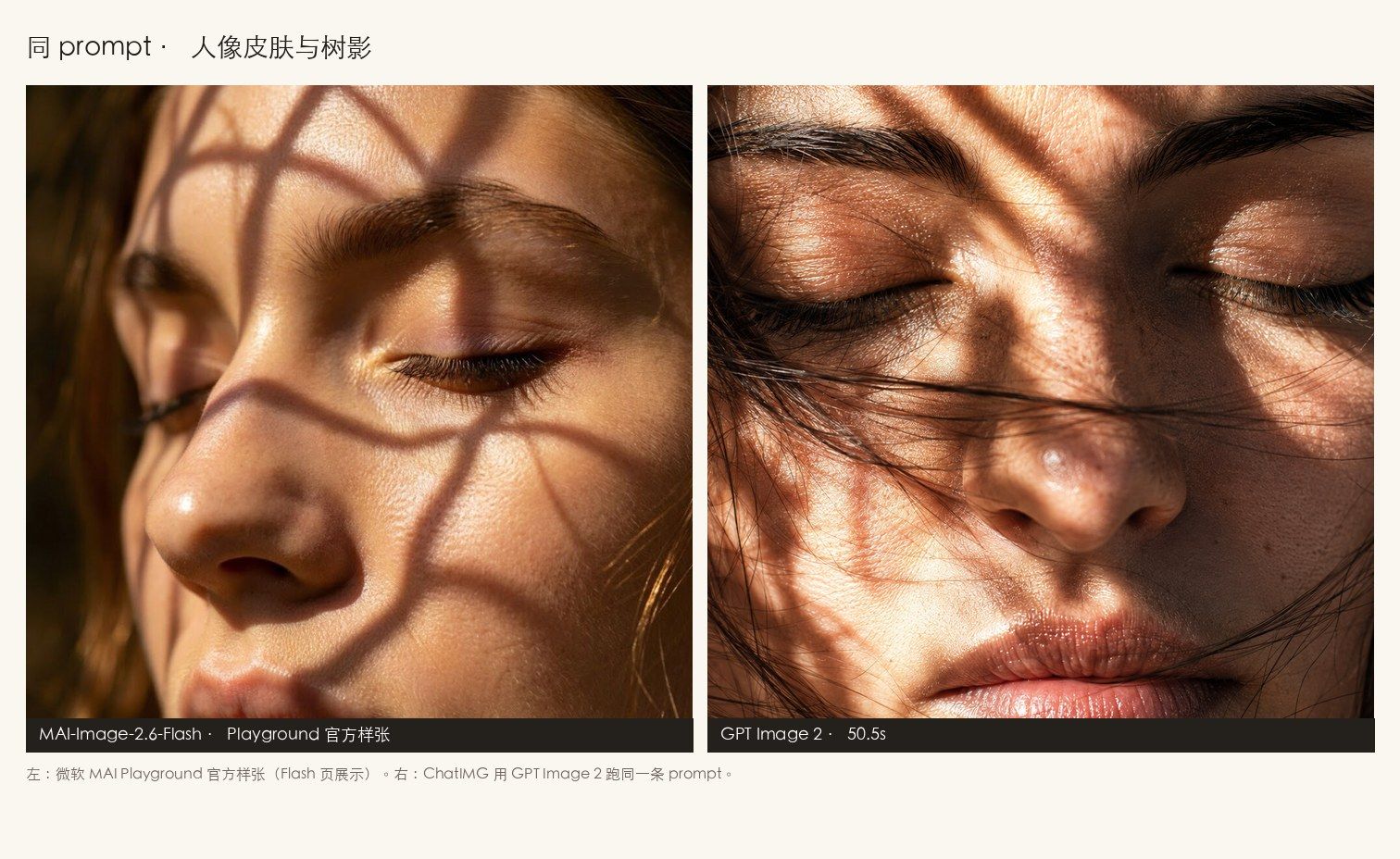 Left: Playground official sample. Right: ChatIMG GPT Image 2 on the same portrait prompt, 50.5s. Source: Microsoft MAI Playground + ChatIMG live run.
The metal knot is closer to “you cannot tell which desk this came from.” Both are catalog-grade chrome. The difference is how tight the knot is, not whether it can be a product shot.
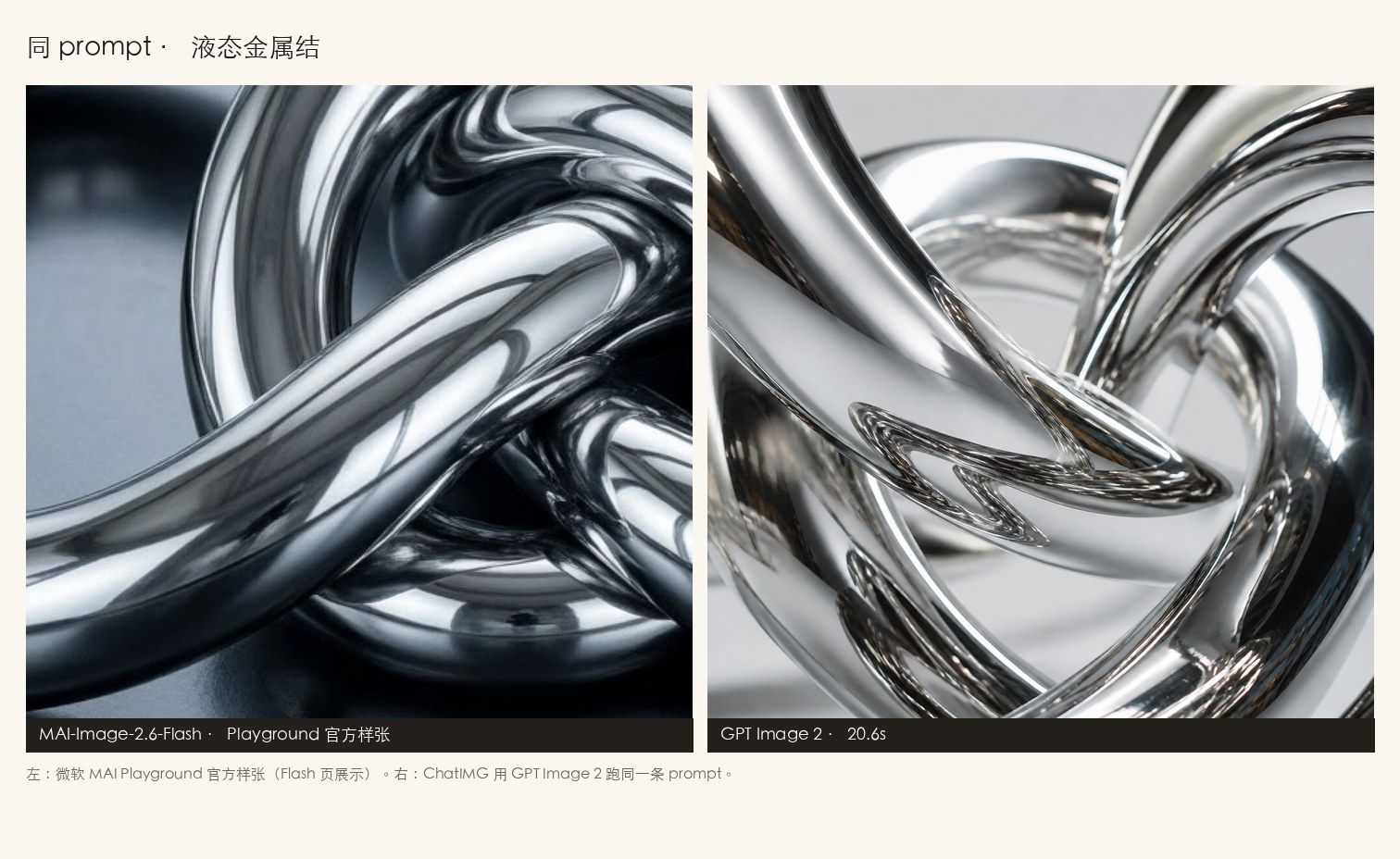 Left: Playground official sample. Right: GPT Image 2, same prompt, 20.6s. Source: Microsoft MAI Playground + ChatIMG live run.
The poster is where you accept a print job. The CAFÉ image on the Playground homepage is a 340-pixel thumbnail that only shows the title block. The prompt still asks for Breakfast / Lunch, Open 9am to 3pm, a price list (Eggs & Cheese $12 through Cardamom Shrub $6), 03.19 2026, and the SULEYMAN and DARCY logos. Hand the same prompt to GPT Image 2 and those fields land on the page. It does not scramble “IAM MAI” into garbage.
Do not read the thumbnail as “Flash cannot lay out a menu.” It only proves the homepage hero crops to the title, not the full poster. The full output needs a logged-in run. We did not get through that step, so we do not write “Flash type is worse.”
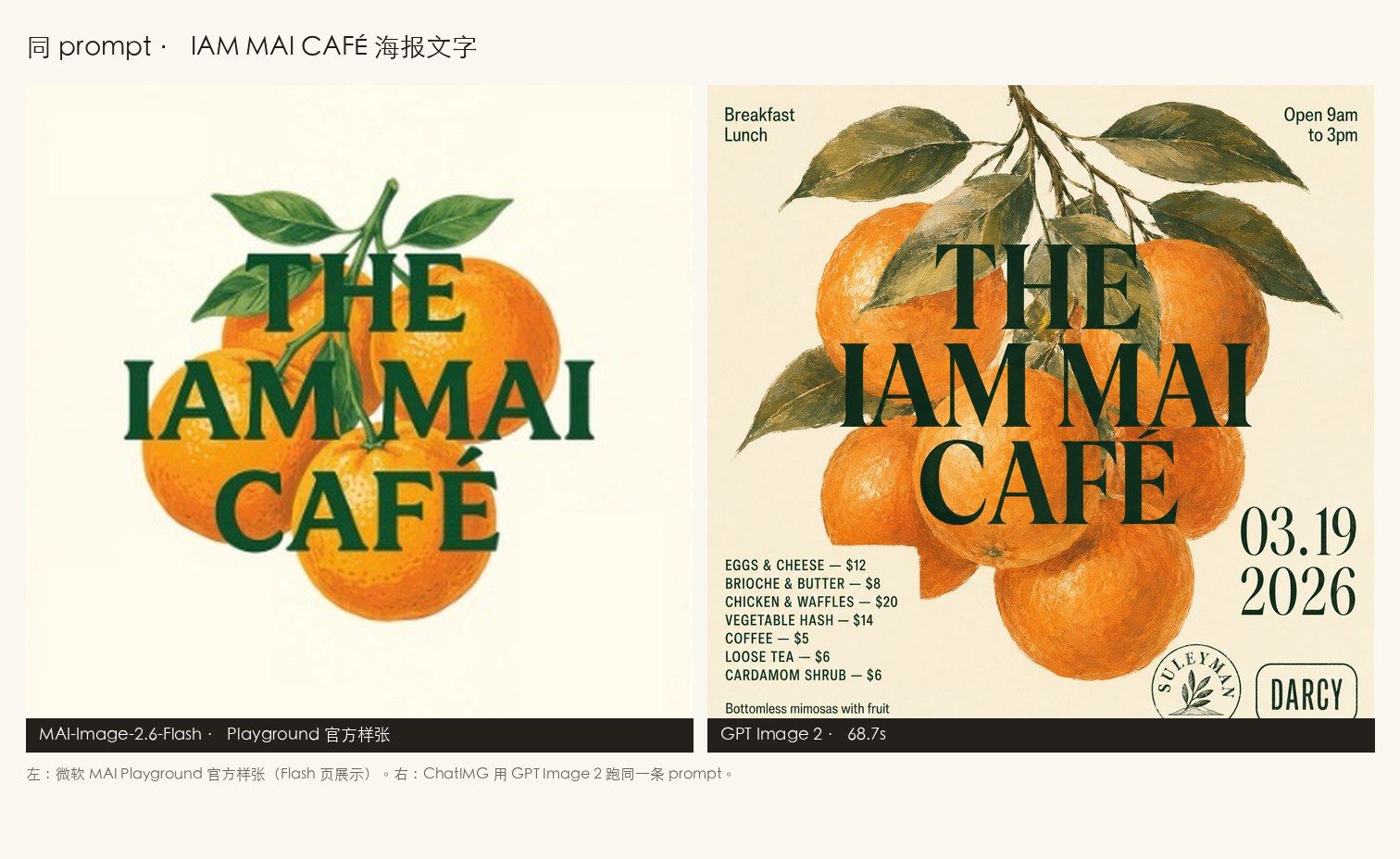 Left: Playground homepage thumbnail, title only. Right: GPT Image 2 lays out menu and prices from the full prompt, 68.7s. Source: Microsoft MAI Playground + ChatIMG live run.
Practical rule: An official sample and a same-prompt live run are not the same class of evidence. The sample proves what the vendor wants you to see. The live run proves what you can get today. Mix them and the conclusion is fake.
Three more runs are ChatIMG’s own jobs, not official samples: an East Asian portrait by a window at 38.4s, a red-type “今日开张 / OPENING TODAY” poster at 29.5s, and a matte-black headphone on marble at 18.4s. On the Chinese opening poster, the character strokes and the English subtitle both stay clean — that is why GPT Image 2 is still getting picked, not an Arena score in a press note.
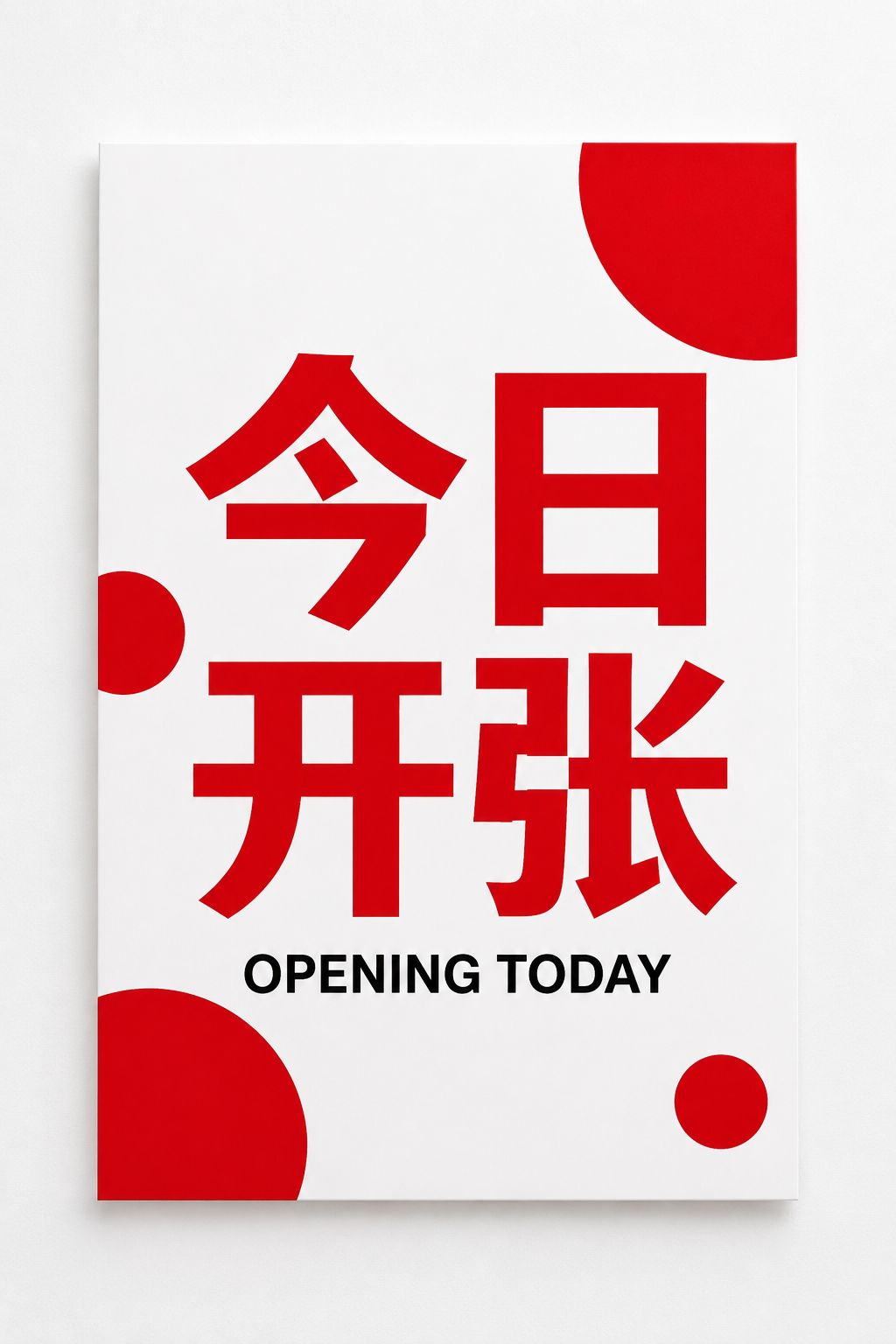 ChatIMG GPT Image 2 on a “今日开张 / OPENING TODAY” poster, 29.5s. Source: ChatIMG live run.
How to read the official numbers: 2.8× and 72%
Short answer: The only 4 September numbers that belong in a sentence are the ones with a source: site copy says Flash is 2.8× faster than GPT-Image-2-Medium with 72% better GPU efficiency; Mustafa’s post says 2× faster than GPT-Image-2; Arena text-to-image and edit both #2 (as of 4 September); Artificial Analysis text-to-image #2, edit #1 (as of 4 September).
Mustafa’s cost/quality scatter that day puts Flash in the “most attractive” quadrant. The x-axis is representative API price per 1,000 images; the y-axis is Image Arena Elo. The caption source is Artificial Analysis. There is only one honest use: a dated anchor — on 4 September, Microsoft placed itself at “quality is enough, price is lower.”
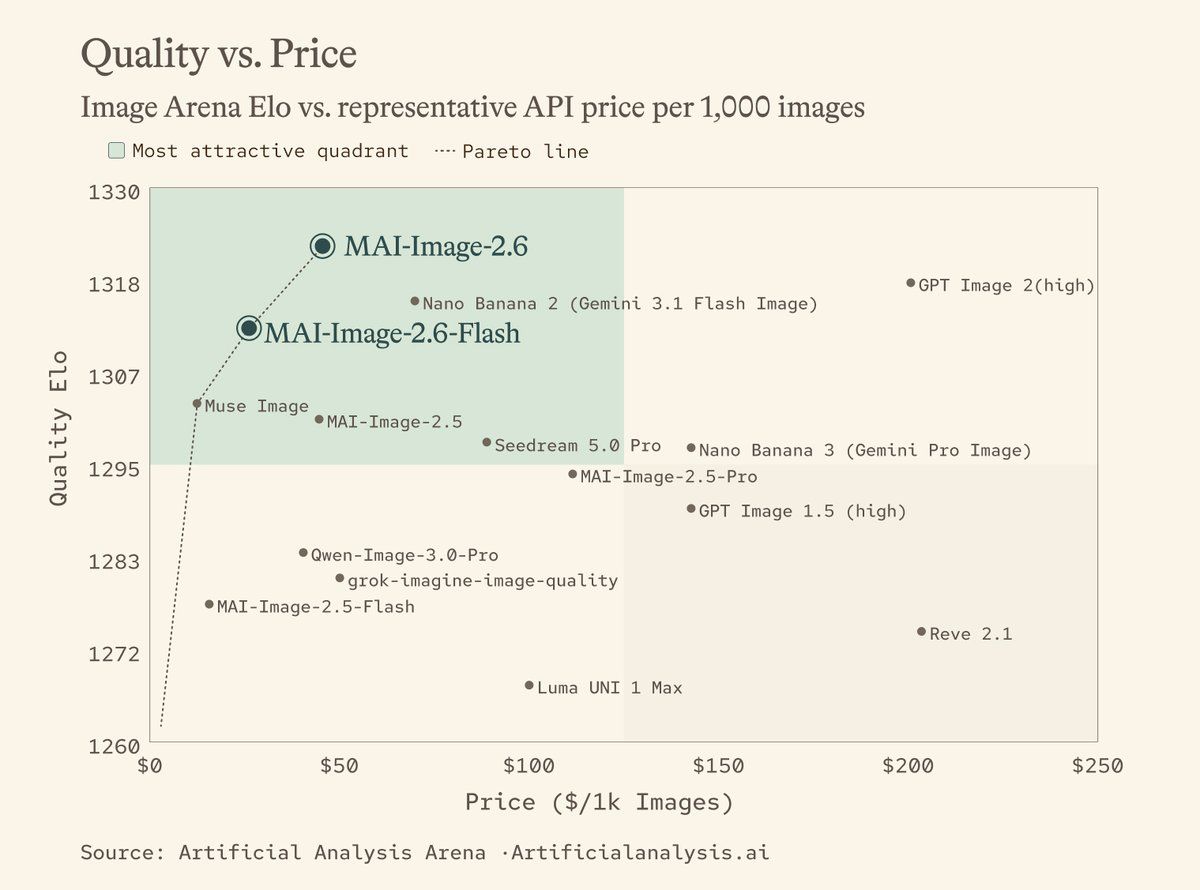 Quality Elo vs representative price per thousand images. Source: Mustafa Suleyman 2026-09-04 post, caption Artificial Analysis Arena.
What you cannot do: translate “2.8×” into “your local click is also 2.8× faster,” or translate “#2” into “still #2.” Our own GPT Image 2 clocks on the three official-sample prompts were 50.5 / 20.6 / 68.7 seconds — that is ChatIMG’s wall clock, not Flash’s. Flash’s wall clock waits on a logged-in Playground or a Foundry bill.
The August 2.6 note also said text-rendering Elo was 91 above 2.5. That is 2.6 vs 2.5, not Flash vs GPT Image 2. For poster jobs, look at the live run in the previous section. Do not treat a family-internal Elo gap as “CJK small type already won.”
Decision filter: Ask one question first — are you buying “cheaper per thousand images,” or “the type on this one sheet can print”? Ledger → Flash narrative. Print job → the generator you can open today.
Pick by task: speed, small type, conversational edit
Short answer: On this September 2026 line, the speed ledger follows the Flash narrative, print small type follows GPT Image 2, and editing an existing image follows chat or local edit. Do not let one model name cover all three.
| Task | Try first | Why | Don’t |
|---|---|---|---|
| Batch generation, GPU / unit cost | Flash’s official narrative (Foundry / Playground) | The 4 September note wrote the comparison as 2.8× and 72% | Falsify throughput with one poster’s wall clock |
| Chinese poster, price list, UI type from scratch | GPT Image 2 | Same-prompt live run laid out menu and prices; ChatIMG is free to try without login | Treat the Playground thumbnail as Flash’s full type ability |
| Existing image, change one spot, freeze the rest | Conversational edit, or the 2.5 local-edit narrative | Instruction-based edit means change one thing, leave the rest, see InstructPix2Pix | Reroll text-to-image and gamble the composition survives |
| You need to see a selection | Region tools (magic wand / segment) | Only the pixel you point at changes; see Grok Imagine vs GPT Image 2 | Treat “scene-aware” as a substitute for a lasso |
For a longer roundup of “draw one image from scratch,” see 2026 AI image generator comparison. This piece compares “the same official prompt, which frame can you get today.”
To see how ChatIMG writes GPT Image 2 as a “text rendering” entry, the landing page is more useful than a leaderboard:
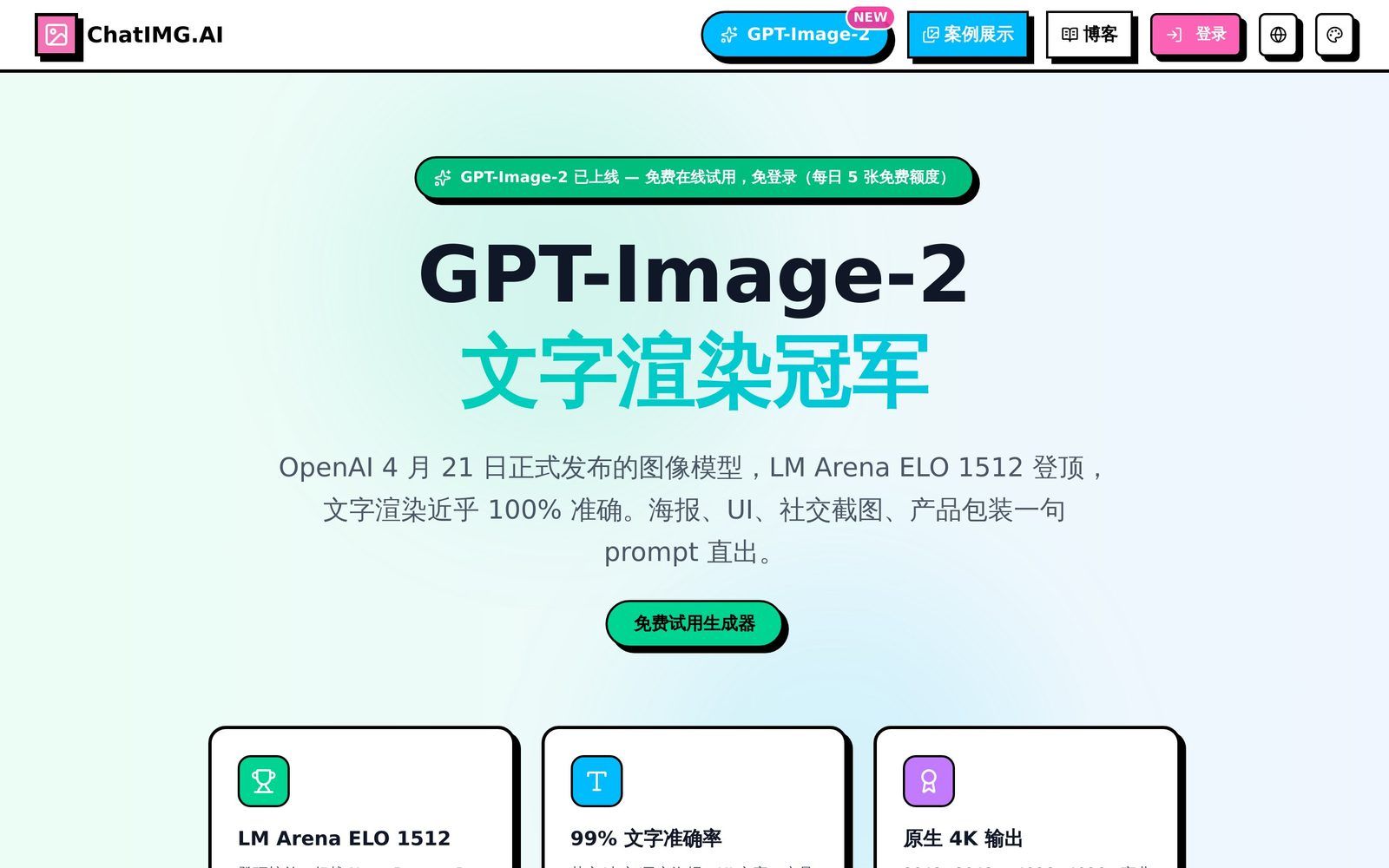 ChatIMG GPT Image 2 landing; the free trial sits above the fold. Source: chatimg.ai/en/landing/gpt-image-2, 2026-09-05.
Try GPT Image 2 free only verifies one thing: whether your own poster type passes. Do not finish acceptance inside a press note.
Practical rule: Accept a poster on the menu rows and price tags, not the title logo. If the title lands and the price tags smear, the image cannot ship.
Can ChatIMG select Flash today?
Short answer: Yes. Open chatimg.ai and pick MAI Image 2.6 Flash in the model dropdown. Text-to-image and reference-image edit both work. Price is 20 credits (GPT Image 2 is 50; welcome trial credits cannot be used).
The event page What is MAI-Image-2.5 still tells the 2.5 local-edit story. 2.5 is not in the picker; the latest Microsoft tier you can select is 2.6 Flash. Do not mix the two pages.
Playground and Foundry remain Microsoft’s own doors: official samples, copied prompts, an Azure subscription. ChatIMG on this side goes through OpenRouter — no Microsoft login, no Azure key of your own.
The right-hand images in this bakeoff are still GPT Image 2, because Flash was not in the picker when the comparison ran. Every “2.8× faster” in this piece cites the site copy only, not our stopwatch. You can now pick Flash and check the wall clock on the same prompt.
Falsifiable predictions
- If Arena text-to-image knocks 2.6 / Flash out of the top three within two weeks: this piece’s “first-tier speed SKU” has to be downgraded; print acceptance is unaffected.
- If Microsoft publishes a reproducible CJK poster test that clearly beats GPT Image 2: the default tool for type-swap jobs has to change. You cannot keep writing “change one line” and “layout from scratch” as the same thing.
- Flash is already in the picker. Path: ChatIMG model dropdown → MAI Image 2.6 Flash, 20 credits. Playground is still Microsoft’s official-sample door. Do not write the two doors as one product path.
- A Playground thumbnail is not the full output. Using the cropped CAFÉ homepage image to falsify Flash type will get the conclusion wrong.
These predictions sit in the body so a 14-day review has something to falsify.
FAQ
What is MAI-Image-2.6-Flash?
A speed-tier image model Microsoft put on Foundry and MAI Playground on 4 September 2026. Site copy says it is 2.8× faster than GPT-Image-2-Medium with 72% better GPU efficiency. Entry: Microsoft announcement.
Is it still Arena #2?
Unknown, and you should not assume. The 4 September note and Mustafa’s post are that day’s snapshot. The board is live; a citation must carry a date.
Can ChatIMG select Flash directly?
Yes. Open chatimg.ai and pick MAI Image 2.6 Flash. For a print-type comparison, you can still try GPT Image 2.
Are the left and right images the same second, same endpoint?
No. Left is a Playground official sample. Right is ChatIMG GPT Image 2 on 2026-09-05, same prompt. Flash’s own generation was blocked by a login wall, so there is no Flash wall clock.
Is this the same thing as 2.5 local edit?
No. 2.5 sells “change the patch you name.” Flash sells throughput. For edit jobs see local edit vs conversational edit. Do not paste speed numbers onto that task.
People who can ship are not the ones chasing every new model name. They write the task verb first, then open a tool. Need print type? Open the generator that already renders type. Need unit cost? Read the dated official ledger.
If you want to try “layout printable type from scratch” now, open chatimg.ai and pick GPT Image 2. If you want to check Flash’s wall clock yourself, pick MAI Image 2.6 Flash — from today, make “can you read the menu row” the default acceptance, not a multiple in a press note.
Try it now:
- 🌐 MAI Image 2.6 Flash: https://chatimg.ai/en?model=mai-image-2.6-flash
- ✨ GPT Image 2: https://chatimg.ai/en?model=gpt-image-2
- 📚 GPT Image 2 landing: https://chatimg.ai/en/landing/gpt-image-2
ChatIMG.ai Team
More in this series
- Best Midjourney Alternatives 2026: Ideogram, Krea, and Chat Edit
- MAI-Image-2.5 Local Edit vs Chat: How to Pick in 2026
- Grok Imagine Image 2.0 vs GPT Image 2: Region Edits and Layout Text in 2026
- Adobe Firefly Precision Flow vs. AI Markup: Two New Paradigms for Precise AI Image Editing in 2026
- Chat to edit a photo — pick GPT Image 2, Nano Banana, or Seedream by task | ChatImg
View all 6 articles in Tool Comparisons →